Directorio
1. Open Feishu Open Platform
Visit Feishu Open Platform and sign in.
2. Create an app
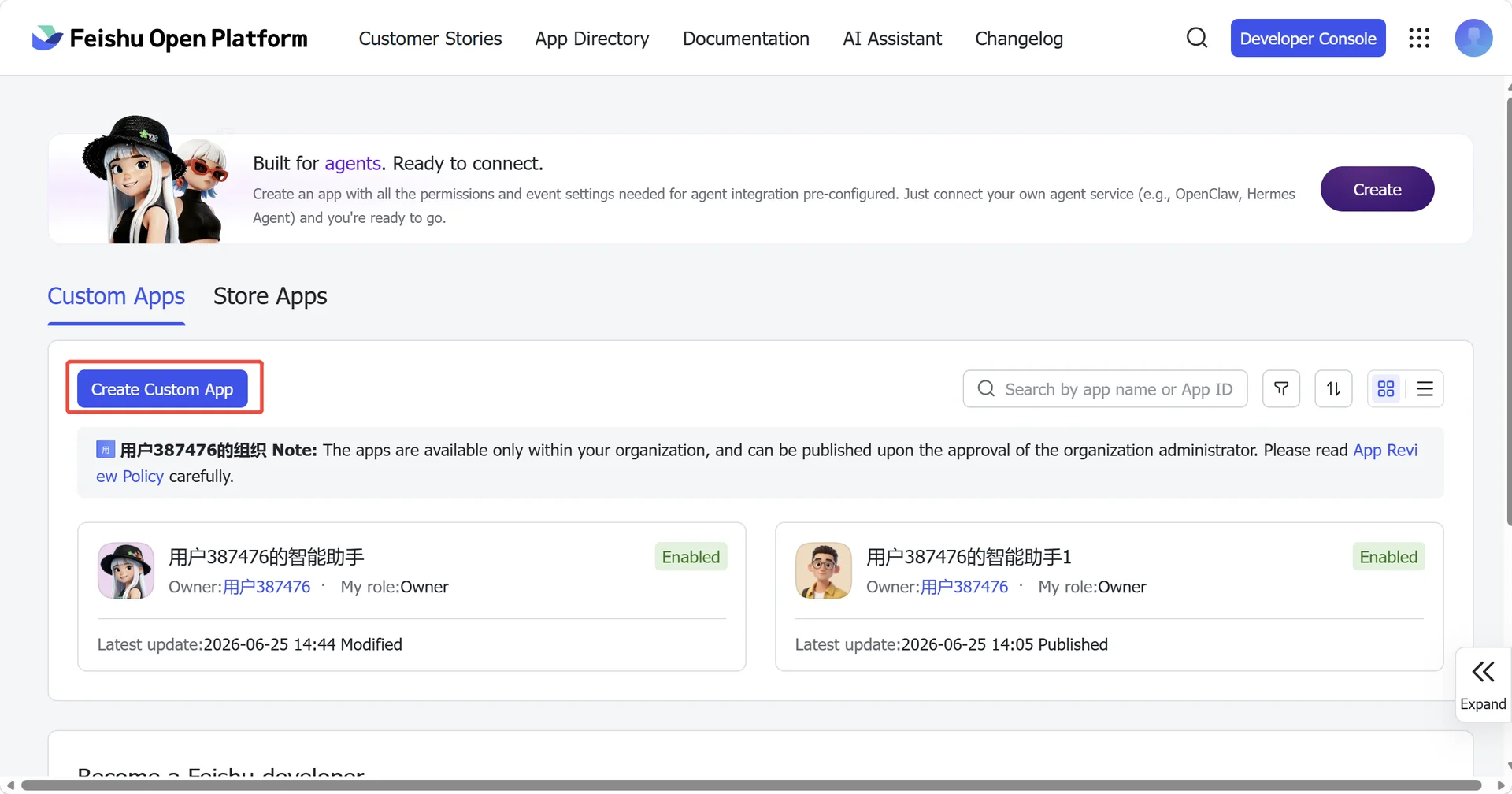
- Click Create enterprise app
- Fill in the app name + description
- Choose an app icon
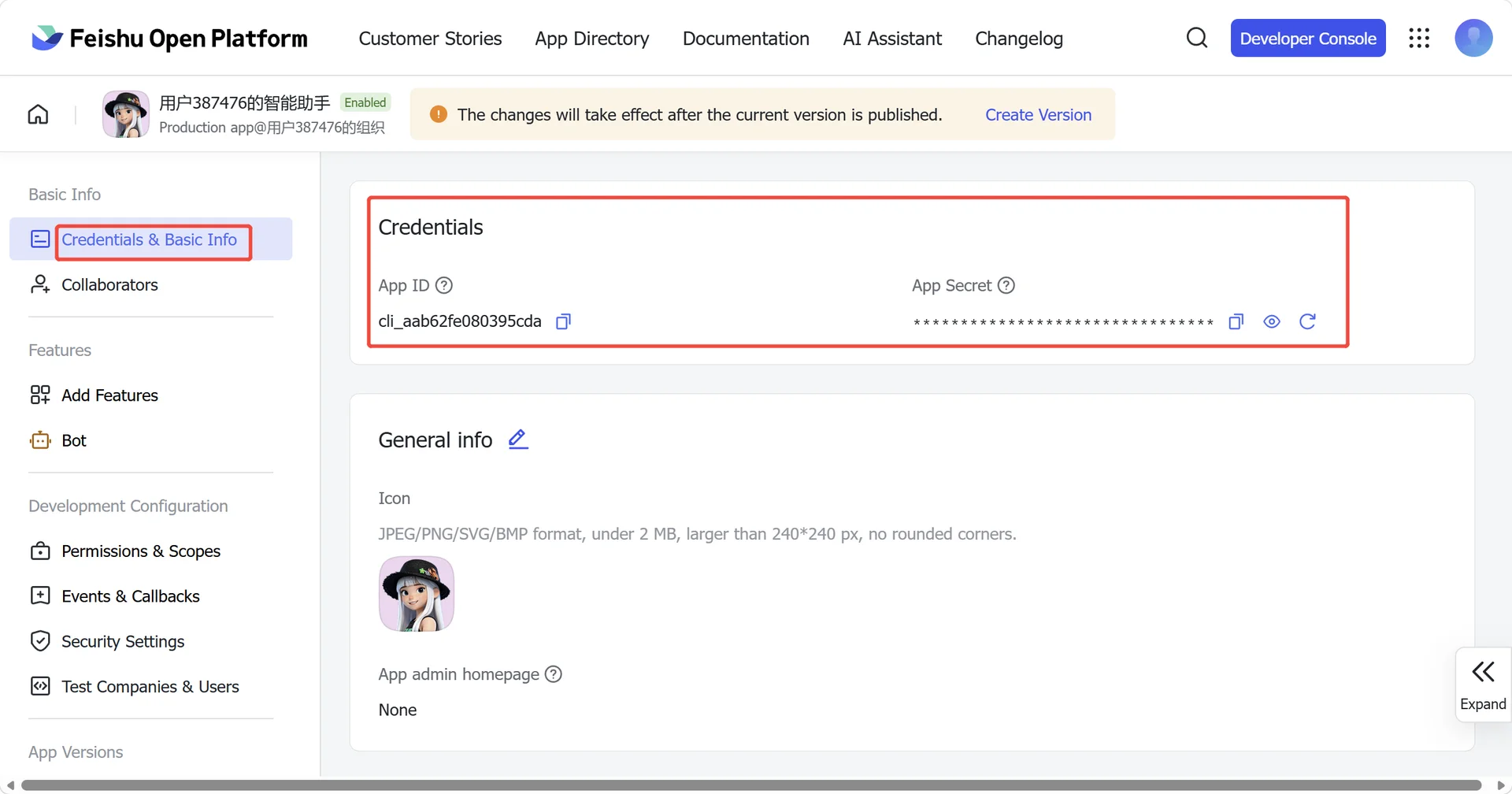
3. Copy credentials
From Credentials & Basic Info, copy:
- App ID (format: cli_xxx)
- App Secret
❗ Important: keep the App Secret private.
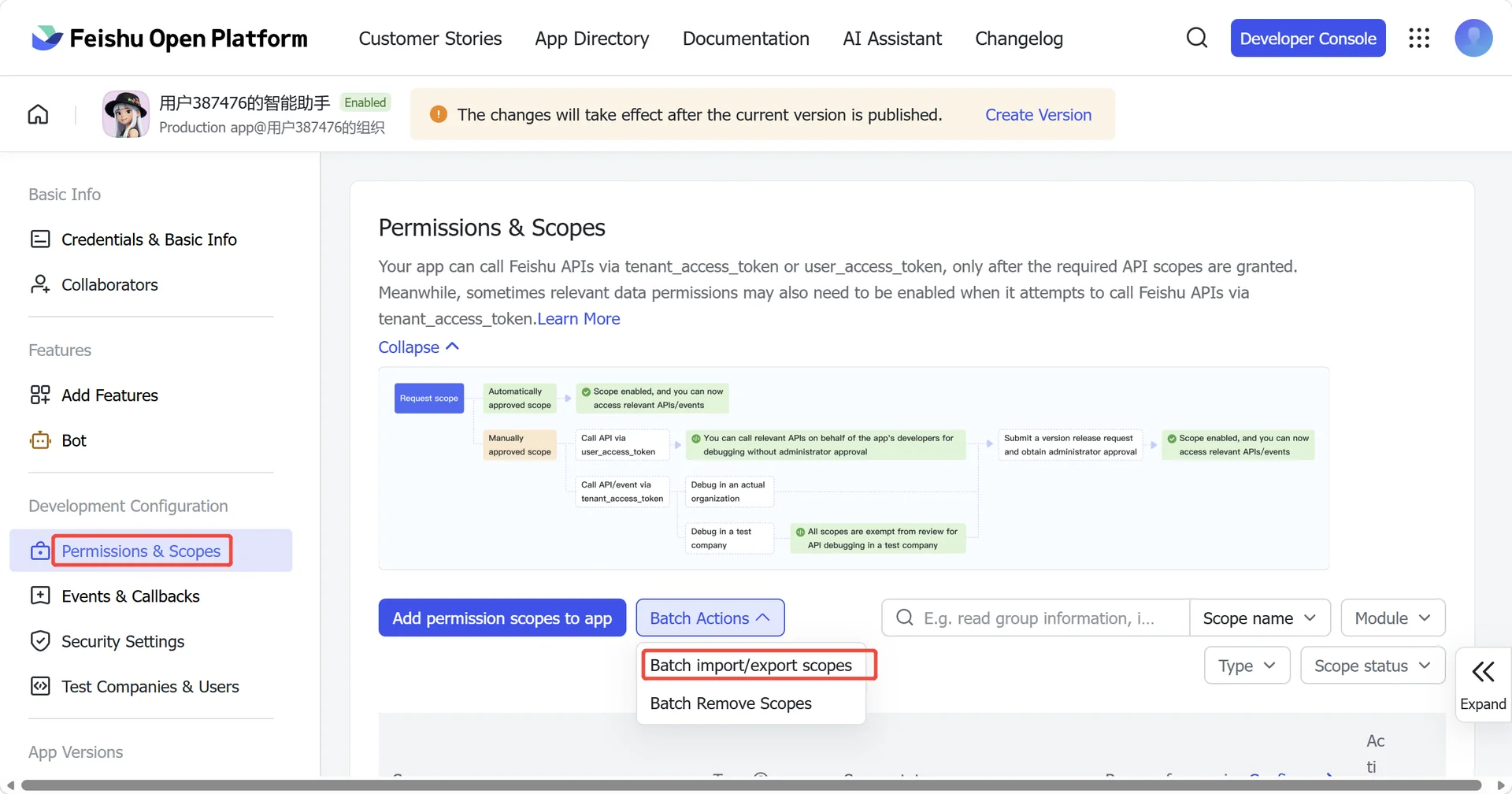
4. Configure permissions
On Permissions, click Batch import and paste:
{
  "scopes": {
    "tenant": [
      "contact:contact.base:readonly",
      "docx:document:readonly",
      "im:chat:read",
      "im:chat:update",
      "im:message.group_at_msg:readonly",
      "im:message.p2p_msg:readonly",
      "im:message.pins:read",
      "im:message.pins:write_only",
      "im:message.reactions:read",
      "im:message.reactions:write_only",
      "im:message:readonly",
      "im:message:recall",
      "im:message:send_as_bot",
      "im:message:send_multi_users",
      "im:message:send_sys_msg",
      "im:message:update",
      "im:resource",
      "application:application:self_manage",
      "cardkit:card:write",
      "cardkit:card:read"
    ],
    "user": [
      "contact:user.employee_id:readonly",
      "offline_access","base:app:copy",
      "base:field:create",
      "base:field:delete",
      "base:field:read",
      "base:field:update",
      "base:record:create",
      "base:record:delete",
      "base:record:retrieve",
      "base:record:update",
      "base:table:create",
      "base:table:delete",
      "base:table:read",
      "base:table:update",
      "base:view:read",
      "base:view:write_only",
      "base:app:create",
      "base:app:update",
      "base:app:read",
      "sheets:spreadsheet.meta:read",
      "sheets:spreadsheet:read",
      "sheets:spreadsheet:create",
      "sheets:spreadsheet:write_only",
      "docs:document:export",
      "docs:document.media:upload",
      "board:whiteboard:node:create",
      "board:whiteboard:node:read",
      "calendar:calendar:read",
      "calendar:calendar.event:create",
      "calendar:calendar.event:delete",
      "calendar:calendar.event:read",
      "calendar:calendar.event:reply",
      "calendar:calendar.event:update",
      "calendar:calendar.free_busy:read",
      "contact:contact.base:readonly",
      "contact:user.base:readonly",
      "contact:user:search",
      "docs:document.comment:create",
      "docs:document.comment:read",
      "docs:document.comment:update",
      "docs:document.media:download",
      "docs:document:copy",
      "docx:document:create",
      "docx:document:readonly",
      "docx:document:write_only",
      "drive:drive.metadata:readonly",
      "drive:file:download",
      "drive:file:upload",
      "im:chat.members:read",
      "im:chat:read",
      "im:message",
      "im:message.group_msg:get_as_user",
      "im:message.p2p_msg:get_as_user",
      "im:message:readonly",
      "search:docs:read",
      "search:message",
      "space:document:delete",
      "space:document:move",
      "space:document:retrieve",
      "task:comment:read",
      "task:comment:write",
      "task:task:read",
      "task:task:write",
      "task:task:writeonly",
      "task:tasklist:read",
      "task:tasklist:write",
      "wiki:node:copy",
      "wiki:node:create",
      "wiki:node:move",
      "wiki:node:read",
      "wiki:node:retrieve",
      "wiki:space:read",
      "wiki:space:retrieve",
      "wiki:space:write_only"
    ]
  }
}
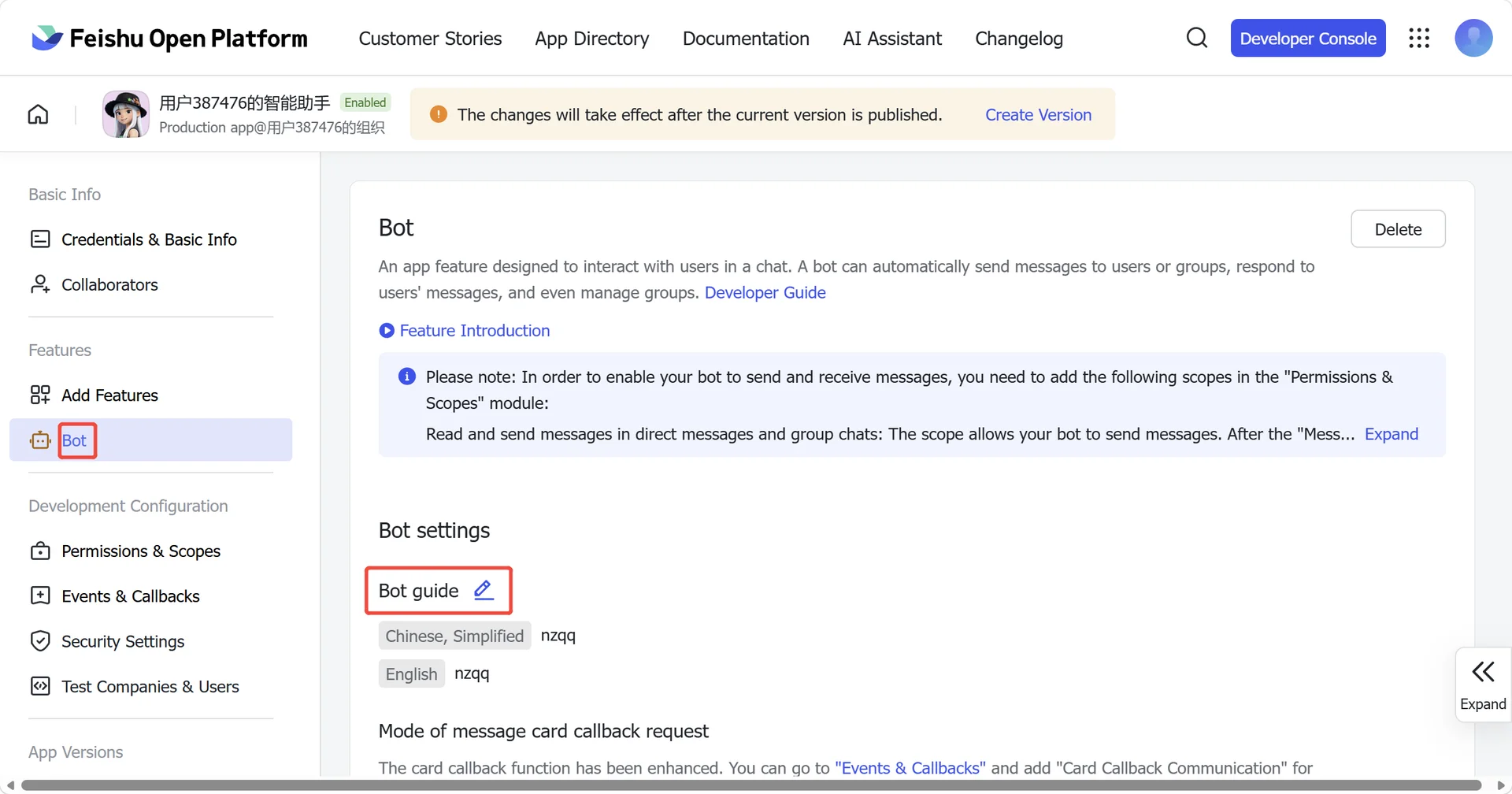
5. Enable bot capability
In App Capability > Bot:
- Enable bot capability
- Set the bot name
6. Publish the app
- Create a version in Version Management & Release
- Submit for review and publish
- Wait for admin approval (enterprise apps usually auto-approve)
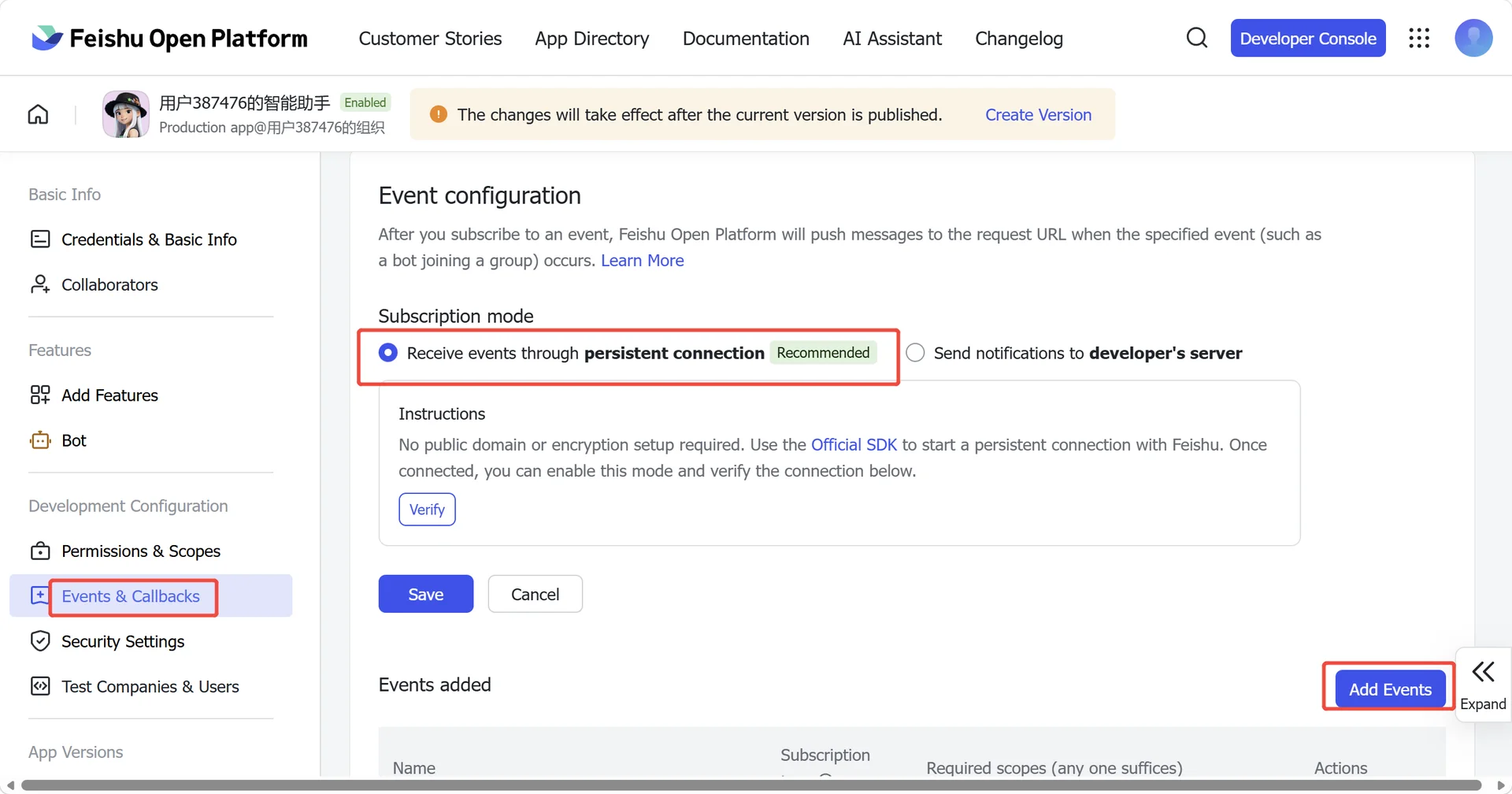
7. Configure event subscription
In Event Subscription:
⚠️ Verify whether the application version has been successfully published. If the publication fails, you will be unable to select the "Receive events through persistent connection" option.
- Choose Receive events through persistent connection (WebSocket)
- Add the event: im.message.receive_v1
⚠️ If the gateway is not running, the persistent-connection setup may fail to save.
8. Publish the app again
- Create a version in Version Management & Release
- Submit for review and publish
- Wait for admin approval (enterprise apps usually auto-approve)
9. Start using
Address book page Feishu search; add group members on the group chat page, just search for the Bot name.
Suscríbete al boletín para recibir información exclusiva sobre seguridad y novedades
 PlugOS — La privacidad no es una opción. Es la base
Seguro · Sin publicidad · Sin rastreo · Sin recolección de datos en segundo plano
Copyright © 2024-2026 TrustKernel
Política de Privacidad | Acuerdo de Servicio al Usuario