1. Overview
In daily work, valuable information is often scattered across conversations, documents, meeting notes, and research materials. If it stays only in temporary records, it can be difficult to find and reuse later. With PlugClaw, this information can be organized into Obsidian knowledge documents and saved to an existing knowledge base, so it can be reused later when preparing materials, presentations, reports, or further analysis.
This case uses a PlugMate product introduction as an example. It shows how product information can be saved as reusable knowledge and later used to create presentation outlines, website copy, and demo materials. This scenario is based on Obsidian, so the device should have the Obsidian app installed and an available knowledge base location prepared.
2. Save Product Introduction Materials
After the PlugMate product introduction has been prepared, it can be saved directly to the Obsidian knowledge base as source material for future product content.
Example prompt:
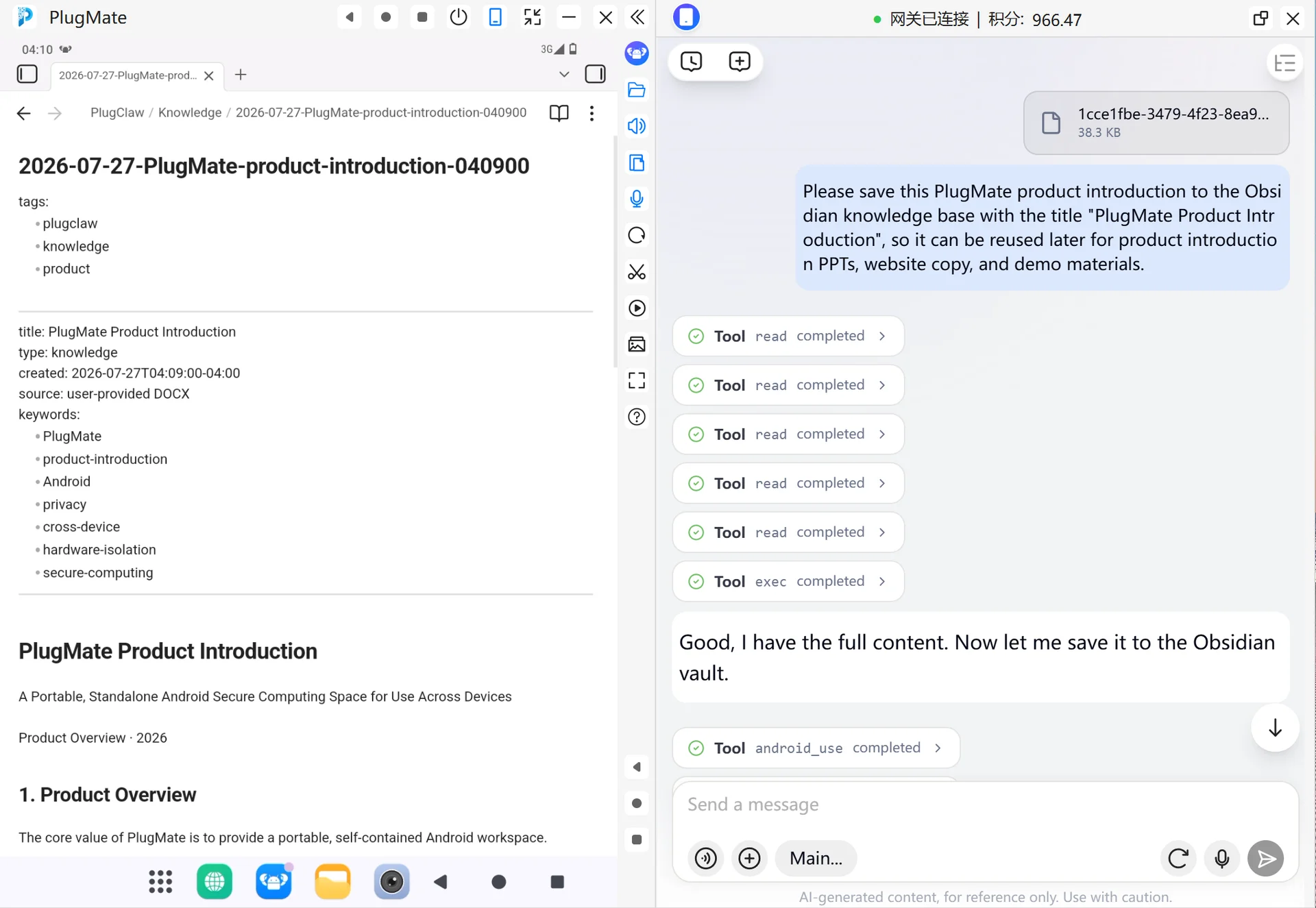
Please save this PlugMate product introduction to the Obsidian knowledge base with the title "PlugMate Product Introduction", so it can be reused later for product introduction PPTs, website copy, and demo materials.
PlugClaw organizes the content into a Markdown document and writes it to the confirmed Obsidian knowledge base. The saved document keeps the title, time, keywords, and structured body. Product positioning, core features, use cases, workflow, and key advantages are organized into one knowledge document.
After saving, open Obsidian and you can see a knowledge document named "PlugMate Product Introduction". When creating a product introduction PPT, website copy, or demo script later, this document can be used as the starting point.
Example:
3. Reuse Existing Knowledge
When product materials, introduction copy, or demo content need to be prepared later, the saved PlugMate materials can be recalled from the knowledge base.
Example prompt:
Search the Obsidian knowledge base for "PlugMate Product Introduction" and help me organize an outline suitable for a product introduction PPT.
PlugClaw finds the relevant material in the Obsidian knowledge base and organizes it into content for the current task. The saved product positioning, core features, and use cases can be turned directly into a PPT outline or introduction copy.
The generated result can continue to be refined, for example:
Make it shorter and rewrite it as copy suitable for the first slide of a PPT.
Keep product positioning, core features, and key advantages, with no more than three points for each section.
4. Suitable Content
Knowledge organization and reuse is suitable for information that has long-term value and may be used again, such as:
- Product introductions, feature descriptions, and demo messaging.
- Meeting notes, discussion conclusions, and follow-up items.
- Research findings, material summaries, and source notes.
- Product plans, requirement background, and decision rationale.
- Common workflows, checklists, troubleshooting notes, and lessons learned.
Once saved, these materials can be reused when creating PPTs, writing documents, preparing demos, drafting website copy, or continuing analysis.
5. Usage Tips
- Prepare an Obsidian knowledge base first: This capability is based on Obsidian. Before saving for the first time, an existing knowledge base location needs to be confirmed. If no knowledge base is available on the device, create one in Obsidian first or provide the location of an existing one.
- Save content with long-term value: Casual conversations, one-time calculations, and content with no reuse value do not need to be saved to the knowledge base.
- Use a specific title: For example, "PlugMate Product Introduction" is easier to find later than "Product Materials".
- Include useful keywords when needed: If the content involves a customer, project, date, version, or product name, include it in the save request.
- Continue refining after saving: Saved materials can be used to generate product introduction PPTs, website copy, demo scripts, or external-facing descriptions.
 PlugOS — La privacidad no es una opción. Es la base
Seguro · Sin publicidad · Sin rastreo · Sin recolección de datos en segundo plano
